
1 of 6
Fewer seats
Seats come off at your renewal as each process moves.
79% of IT leaders saw prices rise at renewal last year.1Renewal coming up?
Lab5 helps free Acme from the annual renewal. Acme stays in the cloud, has more control, and pays less. You are Acme’s hero.

Why move
Lower bills, software you own, and nothing lost on the way.
1 of 6
Seats come off at your renewal as each process moves.
79% of IT leaders saw prices rise at renewal last year.12 of 6
Your data and your software, on systems you control.
32% of companies chose to build software instead of buying it.23 of 6
New screens built around how your people really work, and easy to change.
35% have already replaced a software tool with one they built.34 of 6
A ranked plan and the seats it frees gives you leverage at the table.
5 of 6
Every rule about who sees what comes with you, tested person by person.
Google said over 700 companies' Salesforce data was put at risk through one connected app.46 of 6
One process at a time, never one big switch-over day.
Stop after any step and keep everything built so far.How it works
Pick a step to see what it costs and what you pay for.
Your admin connects your Salesforce Org once. Within a day you see your processes, the seats each one frees, and who sees what.
Who sees what
Years of rules about who sees what move into your own system.
Our AI-enabled tools read who sees which records and fields, how people sign in, and which apps reach your data.
Every rule comes with your data into your own system. Nothing is rebuilt from memory.
Before anyone switches, our tools confirm each person sees exactly what they saw before, and no more.
AI
Every AI tool sees only what the person using it may see.
ChatGPT, Claude, Gemini, Microsoft Copilot or your own agents reach your data one way, with no extra logins.
No shared login that sees everything. Each person keeps their own access.
You get a record of which tools are connected and who asked what.
Before and after
Your data sits with Salesforce. When you leave, you get 30 days to take it out.
A full, current copy also sits in your own database.
Hundreds of reports, and nobody knows which ones get used.
We learn what your teams use the reports for, then rebuild them better.
Automations only one admin understands.
We rebuild each one in your own systems.
Each AI tool gets a login that sees everything, or none at all.
AI tools see only what each person may see, and your own system records every question.
The math
Using Salesforce list prices from September 2026, not your contract.
Yearly saving at the renewal price. It opens on our sample company, where five moves free 110 seats.
100 to 2,000 seats on Sales or Service Cloud. Your renewal is 9 to 12 months away.
If your business runs on industry clouds, CPQ, Marketing Cloud or portals, we'll say so on the first call.
A Salesforce architect with ten-plus years in these systems, and a small team with the same background.
Your Salesforce admin signs in once. The report comes to you both.

Want out?
We move your data and workflows into your own systems, check them against your Salesforce Org, then you switch.
Step by step
In the order that cuts the bill soonest.
We list what you have, then find what people actually use.
Your data goes into a database you control, always current. Who sees what stays exactly the same.
We rebuild each one on your copy. It must pass the tests your team already wrote, and match your Salesforce Org's results.
We ask each report's users a few questions. Their answers shape the new screens.
Choose an open-source CRM, your own tools, or a smaller Salesforce Org for those who want it.
Run both for a while, move everyone over, then switch your Salesforce Org off.
Access and permissions
Your access rules move with your data into your own database. We check them against your Salesforce Org every night.
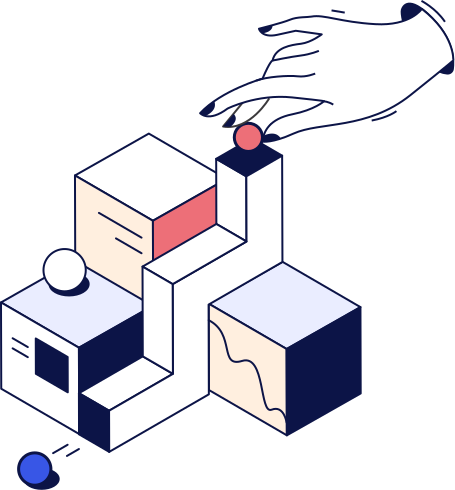
Which rep sees which account, set up in your Salesforce Org over years.
Most copy and backup tools drop those rules. Anyone with the copy sees everything.
The same rules, in your own database.
Every night we check a sample of records against your Salesforce Org.
ChatGPT, Claude, Gemini and Microsoft Copilot get only what the person asking may see.
The rules live in your own database. Nothing depends on a Salesforce login.
Free analysis
Which processes can leave your Salesforce Org first, and what each one saves.
Sample
Acme, Inc., a fictional distributor with 500 seats, as your report will show it.
Loading the sample…
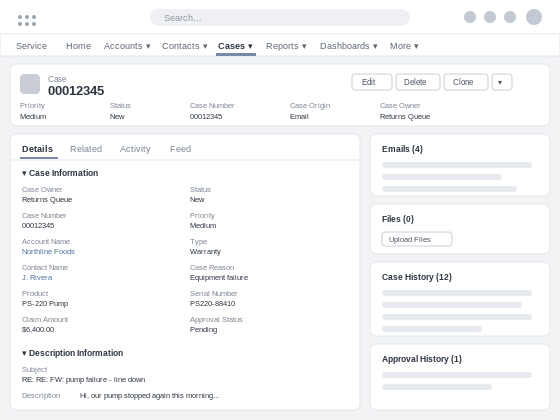
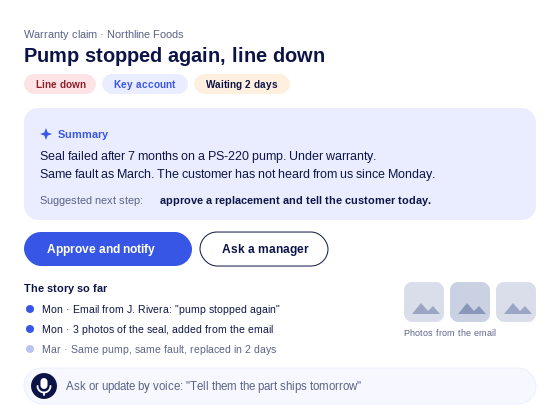
What the warranty agents see
Process 4 in the sample, as the warranty agents work it today and after a move.
How we rebuild
Your new apps must pass your legacy tests.
Custom code (Apex), flows, Process Builder, workflow rules and reports. We work out what each process really does.
Every rule becomes a written test your process owner approves before anything is built.
The tests your team already wrote run against the new apps. In a typical Salesforce Org, 46% of the custom code is tests, so there is a lot to check against.
Start here
Your Salesforce admin signs in once, and the report arrives within a day.
Your admin can run three Salesforce CLI commands and upload the file instead.
sf project generate --name xray && cd xray
sf project generate manifest --from-org you@company.com --output-dir manifest
sf project retrieve start --target-org you@company.com --manifest manifest/package.xml --target-metadata-dir .. --zip-file-name xray-setup
Upload xray-setup.zip, which they will find one folder up.
How others compare
Across 17 Salesforce Orgs, with no names. One joins only when its owner chooses to share.
Next steps
Each step says what you get, what it costs and how long.
Prefer to talk first? Ask us a question
Step 1 · Free
The people who run a process tell us how they really work.
At a glance
Sample survey
Returns and warranty claims, with the lead warranty agent
When a claim arrives by email, it lands in the returns queue. Who picks it up, and how do they choose which one to work first?
Whoever's free. We do the big customers first, and anything that says "line down".
People set a claim's priority by hand. Is it customer size and "line down" that decide it, or something else?
Mostly. Honestly, half the team doesn't set it. We keep a spreadsheet of key accounts.
Claims over $5,000 wait for a manager. What happens while they wait, and does the customer hear anything?
Nothing automatic. We email the customer ourselves if it's been a couple of days.
What came back: priority comes from a spreadsheet, not from their Salesforce Org, and waiting customers are updated by hand. Both become part of the new screens.
Step 2 · Fixed price
Everything in the free analysis, in full, plus your renewal numbers.
At a glance
Want us to run it with you instead? We offer that as a fixed-fee assessment.
Step 3 · Quoted from your report
Eight steps, about 12 weeks. Stop after any one.
Step by step
What the warranty agents see
Sample timeline
An estimate for a process with 20 to 60 users. The first move is the longest; each one after it takes about 4 to 6 weeks, because your system is already set up. Start 9 to 12 months before your renewal to have two or three processes moved by then.
What it isn’t
No big switch-over day, no change to your Salesforce Org until step 7, and no standing meetings. Everyone hears from the move's own page and its emails, and approves their step with one tap.
For Salesforce admins
What the free analysis reads, what you run, and what you get back.
What it reads
CustomObject, ApexClass, ApexTrigger, Flow, Workflow, Profile, PermissionSet, PermissionSetGroup, SharingRules, Role, Layout, FlexiPage, ReportType, CustomMetadata. Report folder by folder, Unfiled Public included, and Dashboard.
SOQL on Report and Dashboard: LastRunDate and LastModifiedDate across your Salesforce Org, LastViewedDate for the connecting user. No Event Monitoring needed.
No record, no write, no scheduled access. The access token is dropped the moment the retrieves end; the downloaded metadata is deleted when the report is written.
Two ways in
OAuth 2.0 web server flow with PKCE. Scope api only, no refresh token. The access token is used for this one job only. While the job runs it is kept encrypted, so a restart on our side does not make you start again, and it is deleted the moment the retrieves end.
If your Salesforce Org blocks an app that is not installed in your Salesforce Org, you need Approve Uninstalled Connected Apps. With API Access Control on, also Use Any API Client.
Signed in to your Salesforce Org with the Salesforce CLI, in an empty folder:
sf project generate --name xray && cd xray
sf project generate manifest --from-org you@company.com --output-dir manifest
sf project retrieve start --target-org you@company.com --manifest manifest/package.xml --target-metadata-dir .. --zip-file-name xray-setup
The manifest step is what gets every report folder; a plain retrieve of Report skips them. The file is xray-setup.zip, one folder up.
What comes back
Every object, field, automation, class, profile and report; what nothing references; what runs on retired tools; a move score per object.
Dashboards and reports ranked by life: last run, last changed, last viewed, with the reports behind each dashboard.
Questions written from your object model for the people behind each report, so a rebuild starts from what they need.
The home page is written for the person who pays the bill. Send it on.
You've been reading for a few minutes
The free analysis turns this into your own numbers in a day.